
You know the feeling before you even open the system.
Forty to sixty patients. Two or three active programs. Some are overdue for follow-up. Some were just discharged. Some haven’t been contacted in two weeks. Each of them is mid-journey somewhere and all of them are yours.
So where do you start?
If your answer involves manual lists, memory, shared spreadsheets, or a quick huddle before the day kicks off, you’re not alone. For a while, it works. Until the caseload grows. Until a handoff gets missed. Until the quiet patient who seemed fine last week suddenly isn’t.
In a value-based care environment, one missed step is expensive and exhausting. And it’s increasingly something you can’t afford.
There’s a smarter way to manage this, and it starts with blueBriX’s Workbench.
What if your queue wasn’t just a list of patients, but an intelligent guide that told you exactly who needs attention, when, and why before you even had to ask? That’s what we’re unpacking in this blog: how intelligent queue management transforms care coordination from a daily juggling act into a system that actually works with you.
The gap between enrollment and outcomes: where coordination breaks down
Getting a patient enrolled is step one. What actually drives outcomes is everything that happens after, and that middle stretch is exactly where most care programs quietly fall apart.
The gaps are specific and familiar: A patient gets enrolled, but no one is clearly assigned. A phase transition happens, but nothing notifies the team. A three-day follow-up was supposed to happen, and nobody knew it didn’t. A supervisor needs to know which patients are stuck but has to manually review every chart to find out.
None of these are people failures. They are visibility failures. The care team is operating without the structural signals that tell them when something needs attention, who owns it, and whether it actually got done.
Individually, each gap looks like a minor hiccup. Across a full panel, they compound, showing up as lower engagement, missed quality metrics, and program performance that consistently underdelivers without a clear reason why.
The fix isn’t more effort. It’s workflows where the right things happen automatically: assignment confirmed at enrollment, transitions that trigger notifications, follow-ups tracked with built-in accountability.
That architecture starts with how your team’s day is structured, and that’s where intelligent queue management comes in.
What intelligent queue management actually means for a care manager's day
Instead of building your day from scratch, the work is already organized. The patients who need attention are surfaced with context on why. Not just a name on a list, but a reason: a status change, a stalled program stage, a follow-up due in 24 hours that no one had to manually flag.
This is what intelligent queue management actually means in practice. A workbench that understands where every patient stands and tells you where to start before you have to figure it out yourself.
The shift it creates is from reactive to proactive. Not doing more, but doing the right things at the right time, backed by the right information. A status change triggers reassignment automatically. A patient stalled longer than expected gets flagged before it becomes a problem. A high-risk case gets consistent attention.
For a care manager carrying a panel of 50 or 100 patients, that distinction is everything. The highest-risk patients get what they need. Nothing slips through because it seemed fine last week. And the cognitive energy that used to go into just orienting to the day goes instead into actually doing the work.
That’s precisely what the blueBriX Workbench is built to deliver. Here’s how it actually works.
Inside the blueBriX Workbench: how we turn patient status into structured action
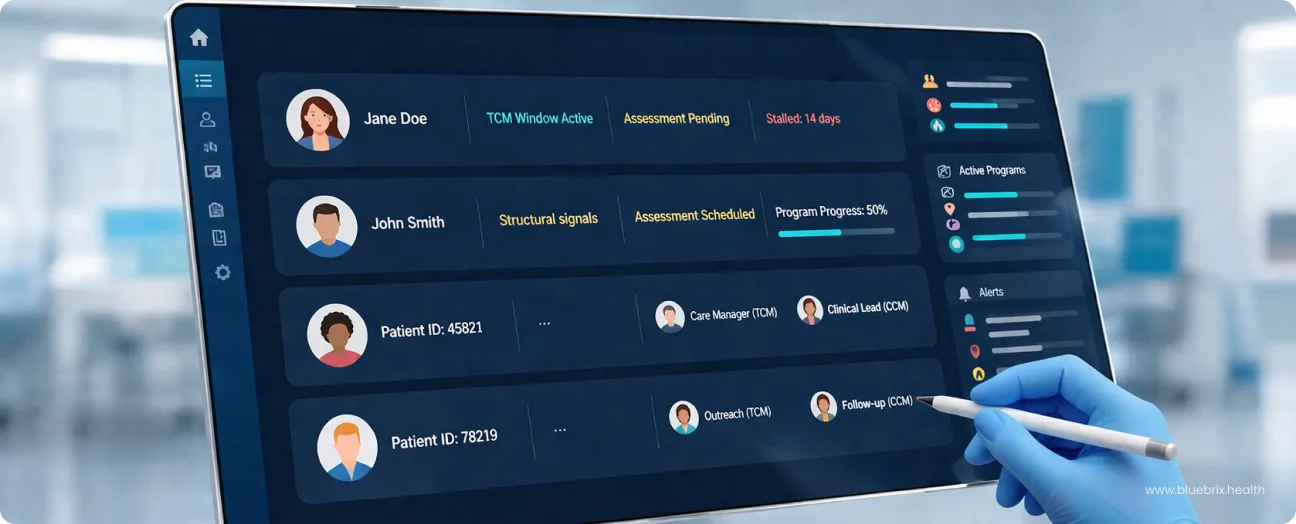
The blueBriX Workbench is the operational hub where care managers run their day. It is a live, actionable view of every patient across every active program, built specifically for the way care coordination actually works. Whether you are looking at a single high-risk patient or managing an entire cohort across a specific chronic care program, the Workbench scales the view to meet the need.
Running value-based care programs means managing patients across multiple stages of enrollment, care transitions, and follow-ups, all at the same time. The gap between knowing what should happen and knowing what is actually happening is where programs lose performance.
It gives your team a single, real-time view of every patient across every active program. You can see which program a patient is enrolled in, which stage they are currently at, and who on the team owns that patient right now. When a patient’s status changes, the dashboard updates immediately. The team is always working from what is true right now, not from a report that is already hours old.
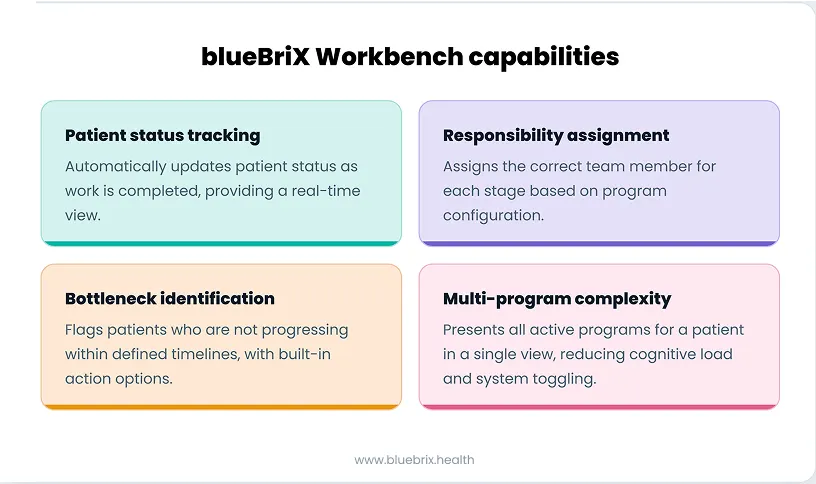
Here is how that plays out across four core capabilities that define how a care team operates day to day.
Patient status tracking: knowing exactly where every patient is at any moment
In any active care program, patient status is constantly shifting. Someone completes an intake. Another moves into their first treatment phase. A third needs aftercare planning. Without a system that tracks these transitions automatically, the team is always playing catch-up.
Let’s see how the blueBriX Workbench manages patient status tracking seamlessly through an example.
A new patient comes in seeking help. Her initial status in the Workbench is “Intake Scheduled.” Once the front desk team completes her intake, the system automatically updates her status to “Assessment Pending.” No one had to manually update a record. No one had to send a message to flag that the next step is due. The workflow moved forward on its own.
That automatic progression is the foundation of how status tracking works in the Workbench. As work gets done, the system moves the patient forward. For the team working the panel day to day, this means they can see at a glance whether a patient is in “Treatment Phase 1,” “Aftercare Planning,” or any other program stage without opening individual charts.
This becomes especially critical when a patient is enrolled in more than one program simultaneously. A patient managing a chronic condition while also receiving behavioral health support has two separate program tracks running at the same time. The Workbench carries both, tracking each independently but presenting them in a single view, so the team always has the full picture without toggling between systems.
Responsibility assignment: making sure every patient has a clear owner
When a patient moves to a new stage in their care program, someone needs to take over. In most manual environments, that handoff depends on team communication, shared lists, or a supervisor stepping in. When communication slips, so does accountability.
In our workbench, when a patient’s status updates, the system assigns the right team member for that stage based on how the care team is configured within the program. So, when a patient’s status moves to “Assessment Pending,” the designated clinical lead is automatically assigned as the responsible owner for that step.
This works because care teams are configured at the program level within blueBriX. Each stage of a program has a defined role attached to it. When a patient reaches that stage, the system knows who should own it. And the owner is notified directly within their system, so the handoff does not depend on someone remembering to follow up or send a message.
Work gets assigned according to program rules. Ownership is always visible. And nothing sits in limbo waiting for someone to notice it needs to be handed off.
Bottleneck identification: catching patients before they fall through the cracks
The hardest patients to track are the ones that are not making noise. The missed follow-up that never got returned. The patient is sitting in the same program stage for two weeks. By the time anyone notices, the intervention window has already passed.
The blueBriX Workbench flags these automatically. Every program stage has a defined timeline. When a patient doesn’t progress within it, the system surfaces them with a warning, no manual checking required.
But here’s where it goes further than most systems: the flag comes with action built in. Schedule a follow-up, update a status, reassign a case — all from the same view, without opening another screen or switching tools. The gap between spotting a problem and solving it is a few clicks.
The stakes are concrete. In TCM, missing the 30-day follow-up window costs both clinically and financially. Similarly, under the mandatory 2026 CMS TEAM model, that cost expands — hospitals are now accountable for the entire post-discharge episode. A patient stalled at any point in that window is a bundled payment risk. Having a system that flags risk before the window closes is the difference between managing that outcome and reacting to it after the fact.
How the blueBriX workbench supports multi-program complexity without adding cognitive load
Managing a patient in one program is straightforward. Managing a patient in three, each with its own status, timeline, and responsible team member is where coordination breaks down fast.
This is the reality for many high-risk patients. Someone managing type 2 diabetes might be simultaneously enrolled in a Medicare Advantage chronic care program, a state-funded medication adherence initiative, and a commercial insurance plan. Without a unified view, the care team is constantly switching systems and manually piecing the picture together.
The blueBriX Workbench brings it all into one place.
Every program a patient is enrolled in is visible from a single screen. Each runs independently — its own status, timeline, and ownership, so there’s no overlap or confusion between them. An update in one program doesn’t bleed into another. They run in parallel, tracked separately, but seen together.
When a care manager needs to focus on a specific program, a quick filter narrows the view without losing access to the full picture. And because the Workbench reflects the hierarchical structure of how programs are built in blueBriX, main programs and subprograms operational complexity stays in the background where it belongs, not on the care manager’s plate.
See how blueBriX Workbench fits your care coordination model
See how the blueBriX Workbench fits within your specific program structure and care coordination model, let’s start with a conversation. Tell us how your team currently manages care coordination and we’ll show you exactly where the Workbench fits in.
Schedule a discovery call